January 8, 2026 – Winnipeg, MB
RITHIM’s Harmony system, an online portal that integrates health research ethics, privacy and institutional assessment reviews in Manitoba, has a few new changes to its interface coming in early 2026, which can be tested by users in advance of launch.
This upgrade focuses on improved accessibility, clearer navigation, and a more consistent experience for applicants and reviewers, without changing core workflows or data. The date of the update is to be determined, but communications will go out once a date is known.
Once the update is launched, users will automatically see the updated layout when they log in. No action is required in advance, and all existing projects, reviews, and records will remain unchanged.
Below, find further information on the update as well as video walkthroughs and support information.
Navigation Changes
The most noticeable change is how users move through Harmony. Navigation and system actions have been reorganized to reduce visual clutter and make key tasks easier to find. Several areas that users rely on daily will remain the same, including project folders, project lists, signatures, transfers, and shared projects.
Navigation and account access
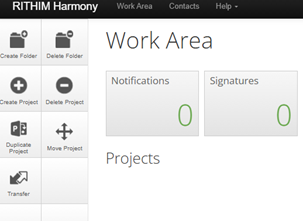
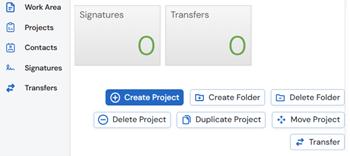
Harmony’s menu bar is moving from the top of the screen to the left side. This new navigation bar provides direct access to the Work Area, Projects, Contacts, Signatures, and Transfers. System actions such as creating or duplicating projects are now located above the project list instead of side tiles.
(Below, left image shows the current interface for RITHIM Harmony and the right image shows the upcoming interface)
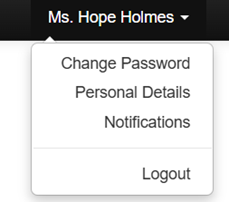
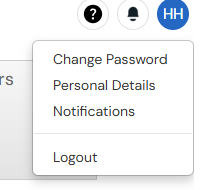
User account options are also changing location. Notifications, help resources, and account settings will now be accessed from icons in the top right corner, including a notifications bell, a help icon, and an account bubble displaying user initials.
(Below, left image shows the current user settings menu for RITHIM Harmony and the right image shows the upcoming user settings menu)
What applicants can expect
Applicants will continue to create, edit, and submit projects using the same forms and requirements as before. The difference is where actions appear on the screen. Project-related actions are now grouped together above the project list, making it easier to see what actions are available at any stage.
Notifications are more prominent and easier to access, helping applicants track required signatures, updates, or requests without searching through the system.
What reviewers can expect
Reviewers will notice similar navigation improvements. Assigned projects, reviews, and required actions are accessed through the same Work Area as before, but with clearer navigation and simplified access to notifications. Review tasks, signatures, and transfers remain unchanged in function, ensuring continuity for review workflows.
Accessibility and support
The updated interface has been designed with accessibility in mind, including improved colour contrast, consistent terminology, keyboard navigation, and screen-reader-friendly layouts. Training videos created by Harmony’s vendor, Infonetica, are available to help users become familiar with the new interface. While the branding may differ slightly, the navigation concepts apply directly to Harmony.
For any additional support, users are encouraged to submit a support ticket through the Harmony Support System.
Related Links:
—
Contact:
Hope Holmes, Communications Officer, Research Manitoba
E: info@researchmb.ca | W: researchmanitoba.ca
Research Manitoba promotes, supports, and coordinates the funding of research excellence and innovation in health, natural and social sciences, engineering, and the humanities in Manitoba. Research Manitoba supports local talent development by providing research support to early career researchers and graduate students, along with fostering partnerships to strengthen research innovation in Manitoba.